Batch Edit Projects
What Batch Edit Projects does
Update Projects' status, Find and Replace in Project Names, Append/Prepend to Project Names, or change Start and End dates for projects. All from one interface inside the projects page.
Video tutorial
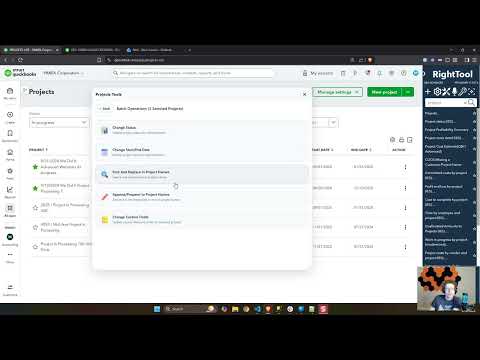
How to turn on Batch Edit Projects
- Install the RightTool for QuickBooks Online Chrome extension.
- Create a RightTool account and upgrade to PRO, then log in from the RightTool options page.
- Open the RightTool options page and choose Batch PRO in the sidebar.
- Switch on Batch Edit Projects, then click Save & Refresh All QBO Tabs.
Get Batch Edit Projects with RightTool PRO
Unlock Batch Edit Projects and every other PRO feature for QuickBooks Online.
Go PRO Add to ChromeMore Batch PRO features
- Reallocate in Expense Pages
- Reallocate Location in Expense Pages
- Bulk Create In Register
- Batch Enter Time Sheets